环境设定
注意
- 搬瓦工年付最便宜 $19.99 10G VPS,KVM 架构。
- VPS 操作系统 Ubuntu 16.04.2 LTS ,已开启 Gooole TCP BBR。
- 本地系统 Windows_NT 10.0.15063 win32 x64,已安装 Hexo 3.3.7,Node.js 版本 6.10.3。
- SSH 连接管理软件 Xshell 5,本地终端 Git for Windows 2.13。
方案选择
传说中有 2 种方案:
注意
- 在 VPS 安装配置 Hexo,完成后
hexo server让它本地运行,之后通过配置 Nginx 让域名指向http://localhost:4000。 - 本地安装配置 Hexo,生成静态文件,然后
git hook或者rsync这类方式部署到 VPS,Nginx 作为 Web 服务器解析。
注意
因为我以前一直是本地生成静态文件部署到 github 或者 coding 上的,显然第二种方案适合我,在这里使用的是git hook 方式部署,因为 Google 搜索出来大多是这种方式,文章多,容易解决问题。
安装 Git 和 Nginx
root 登录 VPS,安装 Git 和 Nginx。
apt-get updateapt-get install git-coreapt-get install nginx配置 Git
新增一个用户 git ,并赋予操作权限。
adduser git提示输入密码,并且填写一些身份信息。完成后赋予权限:
chmod 740 /etc/sudoers编辑 /etc/sudoers,我用的 nano ,不会 vi 。
nano /etc/sudoers在如下图位置添加 git ALL=(ALL:ALL) ALL:
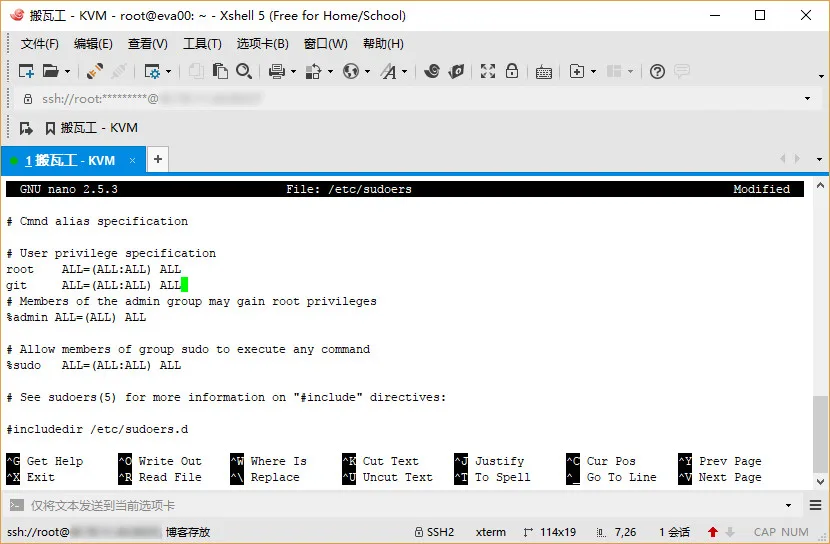
之后保存,记得把权限改回来
chmod 440 /etc/sudoers注意
输入密码不可见,也无星号提示,输入一次,回车,再输一次再回车就好了。身份信息直接一路回车默认就好了。觉得 vi 操作麻烦可以用 nano 来编辑,注意添加位置。
上传本地 ssh 公钥
su git # 切换至 git 用户cd ~mkdir .ssh && cd .sshtouch authorized_keysnano authorized_keys出现编辑框,这里需要把本地 公钥里面内容复制进,本地公钥在 ~/.ssh/id_rsa.pub ,我是直接用编辑器打开复制进去的。复制完成保存。
然后测试一下连接,本地终端运行:
ssh git@VPS IP 地址这里出错了,连不上,原因是搬瓦工默认连接端口不是 22,那么本地 ~/.ssh/ 目录下新建 config 文件 ( 注意没有后缀 ),内容如下:
Host # VPS IP地址HostName # VPS IP地址User gitPort # SSH 端口IdentityFile ~/.ssh/id_rsa完成后再试一下,没问题了。
部署 Git 库
cd ~mkdir hexo.git && cd hexo.gitgit init --bare授权配置钩子
cd /var/wwwsudo mkdir hexo #需要输入 git 用户密码sudo chown git:git -R /var/www/hexocd ~/hexo.git/hooksnano post-receive编辑框输入以下内容:
#!/bin/bashGIT_REPO=/home/git/hexo.gitTMP_GIT_CLONE=/tmp/hexoPUBLIC_WWW=/var/www/hexorm -rf ${TMP_GIT_CLONE}git clone $GIT_REPO $TMP_GIT_CLONErm -rf ${PUBLIC_WWW}/*cp -rf ${TMP_GIT_CLONE}/* ${PUBLIC_WWW}并赋予权限
chmod +x post-receive至此,VPS Git 配置完成。接下来是 Nginx。
配置 Nginx
为了方面先可以切换到 root 用户,首先配置 Nginx 站点文件:
nano /etc/nginx/conf.d/hexo.conf输入以下内容并保存,酌情修改:
server { listen 80 ; listen [::]:80; root /var/www/hexo; server_name clearsky.me www.clearsky.me; access_log /var/log/nginx/hexo_access.log; error_log /var/log/nginx/hexo_error.log; error_page 404 = /404.html; location ~* ^.+\.(ico|gif|jpg|jpeg|png)$ { root /var/www/hexo; access_log off; expires 1d; } location ~* ^.+\.(css|js|txt|xml|swf|wav)$ { root /var/www/hexo; access_log off; expires 10m; } location / { root /var/www/hexo; if (-f $request_filename) { rewrite ^/(.*)$ /$1 break; } } location /nginx_status { stub_status on; access_log off; }}完成后重启 Nginx。
/etc/init.d/nginx restart配置 Hexo 部署
和部署到 github 和 coding 一样,修改 Hexo 配置文件 _config.yml 的 deploy 部分:
deploy: type: git repo: git@VPS的IP:hexo.git,master完成测试
和往常一样,hexo g -d ,看了一下没问题了。
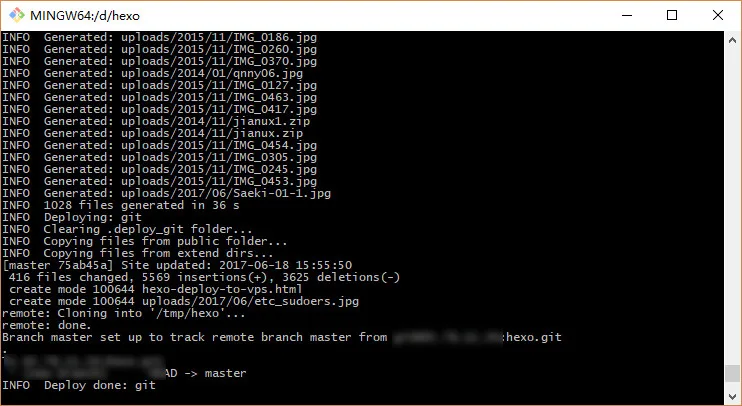
先吃饭,回来再添加下 SSL 证书。
评论
GitHub 登录后可评论。
评论区会在滚动到这里时自动加载。